TL;DR
High-intent users often reach the checkout page and fill in their details, but abandon the process before clicking the final button. This “Submission Gap” is usually caused by hidden costs, unnecessary fields, form errors, and mobile friction. Optimizing the checkout experience and capturing partial leads can recover lost revenue without increasing ad spend.
Introduction: The Real Problem: High-Intent Buyers Are Dropping
Every e-commerce store faces a common pattern: visitors add products to their cart, proceed to checkout, fill in their details, and then leave without completing the purchase.
These users are not casual visitors. They are high-intent buyers who have already invested time and shared their information. This usually indicates a strong intention to purchase. However, some form of friction at the final step prevents them from completing the transaction.
This is where silent revenue leakage begins. Traffic and advertising campaigns may be performing well, but if the checkout process is losing high-intent users, revenue quietly slips away.
In many cases, the issue is not with the products or ads the real problem lies in the checkout experience itself.
Real Experience Insight: What Happened After Launching Glowaid
When we launched Glowaid, a skincare and supplement brand built on WordPress + WooCommerce, we immediately started seeing activity on the website. Traffic was coming in, ads were performing well, and users were actively browsing products.
At first glance, everything seemed to be working well. Traffic was coming in, ads were performing, and users were actively adding products to their carts. However, a deeper look at the data revealed a different story.
Although many visitors were reaching the checkout page, the number of completed orders was much lower than expected compared to the traffic we were receiving. This raised an important question: where exactly were we losing potential customers?
After carefully analyzing user behavior, we noticed a clear pattern. Many users were starting the checkout process but abandoning it after filling only a few fields. This suggested that the issue was not with the product, pricing, or advertisements. Instead, the real friction existed within the checkout experience itself.
This discovery shifted our focus completely. Instead of optimizing ads or increasing traffic, we realized that improving the checkout experience could significantly increase conversions.
The Original Checkout Setup
The default WooCommerce checkout setup had several issues that created unnecessary friction for users.
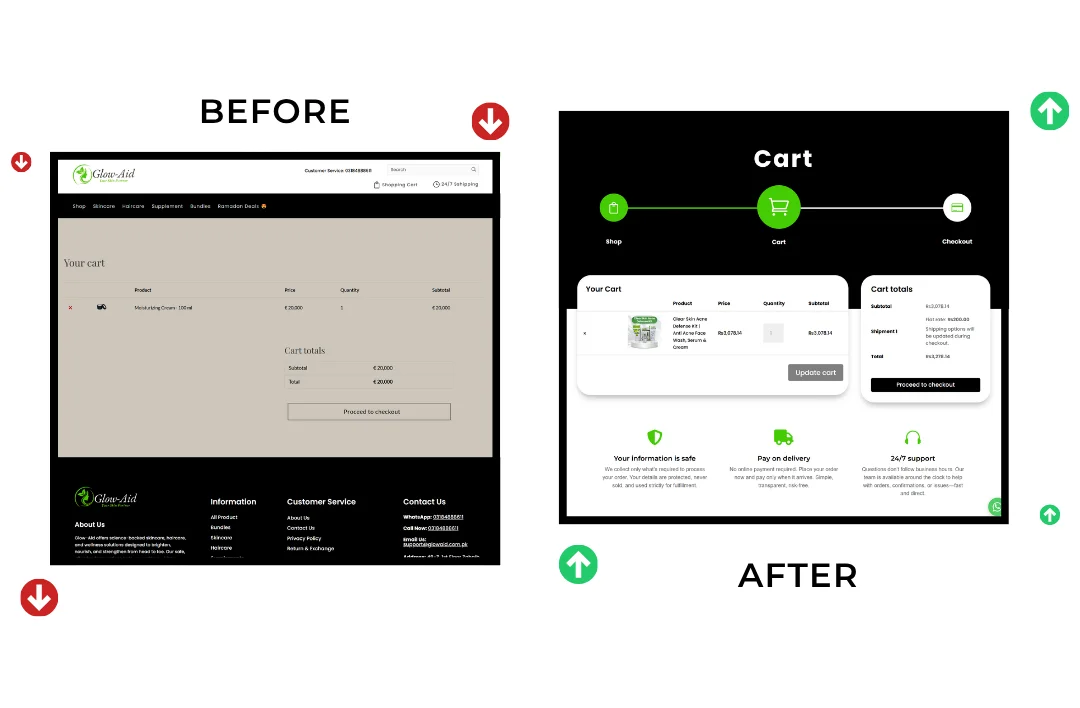
First, there was a disconnect between the cart and the overall brand experience. The cart page looked generic and did not match the design or feel of the main website, which can subtly reduce user trust.
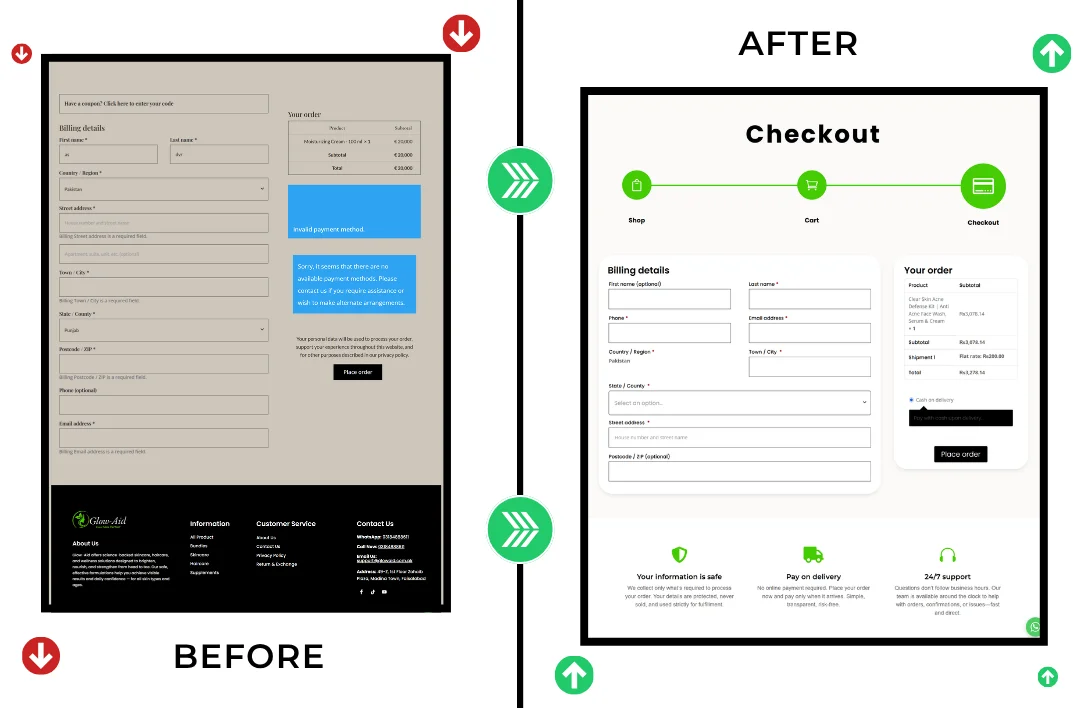
Second, the checkout form contained too many fields. There were more than 15 fields, including optional company information, additional phone fields, and repeated country and state selections. For many users, especially on mobile devices, this made the checkout process feel longer and more complicated than it needed to be.
Another issue was the poor visual hierarchy. Important elements such as buttons and form fields blended together, making it unclear what the next step was.
Mobile users also faced several usability problems. Incorrect keyboard triggers, unnecessary zooming, and scrolling made the process frustrating on smaller screens.
Finally, the checkout design did not fully match the brand’s color scheme, which can subconsciously affect user trust during the final step of the purchase.
Even though the checkout technically worked, these small friction points were enough to cause high-intent buyers to abandon their purchase, leading to silent revenue loss.
Step 1: Audit and User Research
To properly understand the problem, we conducted a detailed audit of the checkout process.
We started by performing simulated purchases, testing the checkout as if we were first-time customers. This helped us identify hesitation points and areas where the experience felt confusing or slow.
Next, we carried out a competitive analysis. We studied high-performing e-commerce stores to understand how their checkout pages were structured. We focused on layout simplicity, field design, and the overall flow.
We also reviewed WooCommerce settings and plugins to identify unnecessary fields and configurations that could be simplified.
The research clearly showed that the biggest causes of abandonment were unnecessary fields, repeated micro-decisions, and poor mobile usability not issues related to the product, ads, or pricing.
Step 2: Strategic Checkout Redesign
Based on the insights from our research, we redesigned the checkout process with a focus on simplicity and usability.
Field Reduction
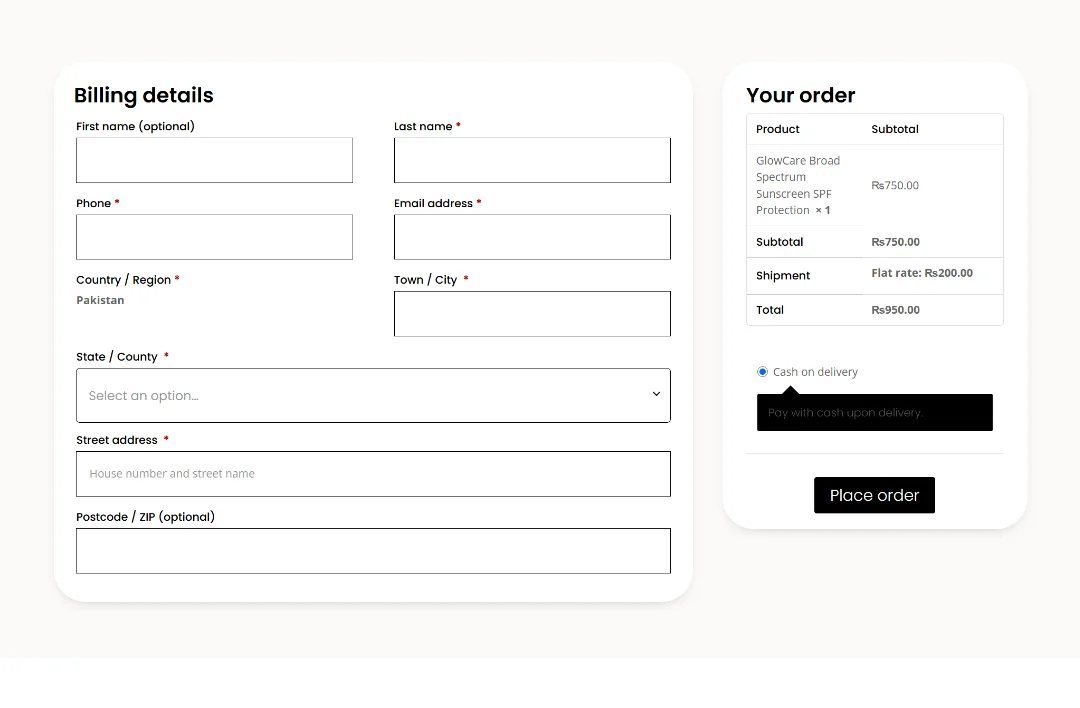
We removed unnecessary form fields and kept only the essential information required to complete an order:
First Name (optional)
- Last Name
- Phone Number
- Email Address
- Country/Region (pre-set to Pakistan)
- Town/City
- State/County (pre-set)
- Street Address
- Postcode/ZIP (optional)
By reducing the number of required fields, the checkout process immediately became faster and less overwhelming.
Visual and Color Improvements
We aligned the checkout design with the brand’s color palette and improved the visual hierarchy. Buttons and important actions became more visible, naturally guiding users toward the “Place Order” button.
Mobile-First Layout
Since a large portion of traffic came from mobile devices, we redesigned the checkout using a single-column layout.
Spacing between fields was adjusted to improve thumb navigation, and numeric keyboards were automatically triggered for phone numbers and ZIP codes. These small improvements made the experience significantly smoother on mobile devices.
Step 3: Pre-Setting Defaults and Reducing Micro-Decisions
Another important improvement was pre-setting default values for common fields.
The country was automatically set to Pakistan, and the most common state or region was also pre-selected. This reduced unnecessary clicks and small decisions that can slow users down during checkout.
When users feel that a system already understands their context, the process feels smoother and more intuitive. As a result, trust increases and abandonment decreases.
Step 4: Testing, Feedback, and Iteration
After implementing these changes, we tested the new checkout across multiple devices and scenarios, including first-time buyers, returning customers, mobile users, and desktop users.
We also collected feedback from loyal customers and made small adjustments to spacing, field placement, and contrast to further improve usability.
This iterative approach ensured that the checkout was not only functional but also optimized for the best possible conversion experience.
Step 5: Results and Revenue Impact
The improvements in the checkout process produced clear results.
The time required to complete checkout was significantly reduced. User friction decreased, and checkout abandonment dropped noticeably.
As a result, the same traffic and advertising spend started converting more effectively, leading to an increase in monthly revenue without the need for additional marketing investment.
This experience reinforced an important lesson: checkout optimization is not just a cosmetic improvement it is a strategic one.
Small but deliberate changes, such as reducing form fields, pre-setting options, and improving mobile usability, can have a direct and measurable impact on revenue and user trust.
Comparison Table: Default WooCommerce vs Optimized Checkout
| Feature / Factor | Default WooCommerce Checkout | Optimized Conversion Checkout |
|---|---|---|
| Visual Trust & Branding | Generic design, weak brand consistency | Fully brand-aligned design that builds trust at the final step |
| Cart → Checkout Flow | Feels disconnected from rest of website | Seamless, guided flow from cart to payment |
| Number of Form Fields | 15+ fields including unnecessary info | Only essential fields kept (reduced friction) |
| Form Complexity | Multiple optional fields create hesitation | Streamlined, decision-focused layout |
| Mobile Experience | Multi-column layout, zooming & scrolling | Single-column mobile-first design |
| Keyboard Optimization | Default keyboard for all inputs | Numeric keyboard for phone & ZIP |
| Visual Hierarchy | Buttons and fields blend together | Strong CTA focus guiding to Place Order |
| Micro-Decisions | Country & region must be selected manually | Country & state pre-selected automatically |
| Checkout Speed | Feels long and overwhelming | Fast and effortless completion |
| User Confidence Signals | Minimal reassurance during checkout | Security, support & payment trust signals visible |
| Error Prevention | Higher chance of form mistakes | Simplified inputs reduce errors |
| Abandonment Risk | High - friction at final step | Reduced - smoother checkout journey |
| Revenue Efficiency | Traffic leaks before purchase | More visitors convert without extra ads |
Recovery Framework for Abandoned Checkouts
Even a well-optimized checkout can lose some users. That is why capturing high-intent leads is important.
Partial Form Persistence
A user’s email can be saved immediately when they move to the next field (using an onblur event).
Even if the user closes the tab, the lead has already been captured.
Support-First Email Sequence
Instead of sending a pushy “Buy Now” email, a friendly message can be sent:
“Hi [Name], we noticed you started checkout but may have encountered a technical issue. If you need help, we’re here. Your cart has been saved so you don’t have to re-enter your details.”
This approach builds trust and increases the chances that users will return to complete their purchase.
The Bottom Line
Traffic creates opportunity, but checkout architecture captures revenue.
Example from Glowaid:
Monthly sales: $10,000
Checkout drop-off rate: 20%
Potential lost revenue: $2,000
If a recovery system brings back just 25% of those users, it can generate $500 in additional revenue without increasing ad spend.
Conclusion
High-intent buyers are rare. Simply driving traffic is not enough the checkout is the final gatekeeper.
When checkout is intentionally designed and friction is reduced:
- Completed orders increase
- Revenue efficiency improves
- The store owner builds stronger strategic authority
Small improvements such as essential fields, pre-selected defaults, and mobile optimization can transform potential losses into captured revenue.
Fixing checkout is not a cosmetic change it is a strategic lever that defines successful e-commerce systems.